
![FAB Balance Check [2026]: Complete Guide to FAB Bank Balance Check Online](https://dubaibrief.com/wp-content/uploads/2026/06/fab-balance-check.webp)
Managing your finances starts with knowing your available account balance. Whether you want to verify a salary deposit, monitor daily spending, or check available funds before making a payment, a quick FAB balance check helps you stay in control of your money.
- What Is FAB Balance Check?
- Quick Overview of All FAB Balance Check Methods in 2026
- FAB Balance Check Online Through Mobile Banking App
- Benefits of Using the Mobile App
- Requirements Before Registration
- How to Register for Mobile Banking
- How to Check FAB Balance Online Using the App
- Mobile App Security Tips
- Common Mobile App Issues and Solutions
- FAB Bank Balance Check Online via Internet Banking
- Requirements for Online Banking Access
- How to Register for Online Banking
- Steps to Perform FAB Bank Balance Check Online
- Visit the Official Banking Portal
- Log In to Your Account
- Complete Multi-Factor Authentication
- View Account Dashboard
- Check Detailed Account Information
- Common Online Banking Login Problems
- FAB Salary Card Balance Check Online
- Different Types of Salary Cards
- How to Perform FAB Salary Card Balance Check Online
- Information Required for Salary Card Balance Check
- Salary Card Balance Check for UAE Employees
- Common Salary Card Issues and Fixes
- FAB Ratibi Card Balance Check
- FAB Prepaid Card Balance Check
- FAB Balance Check Through PPC Inquiry Portal
- Required Information Before Starting
- Step-by-Step PPC Balance Inquiry Process
- Troubleshooting PPC Inquiry Errors
- FAB ATM Balance Check
- Benefits of ATM Balance Inquiry
- Step-by-Step FAB ATM Balance Check Process
- ATM Safety Tips
- Common ATM Issues and Solutions
- FAB Balance Check Salary via SMS Banking
- How SMS Banking Works
- SMS Banking Registration Methods
- SMS Format for Balance Enquiry
- Understanding SMS Balance Responses
- FAB Balance Check Through Phone Banking
- FAB Balance Check Using Payit Wallet
- FAB Balance Check Through Branch Visit
- When Visiting a Branch Is Useful
- Documents Required
- Step-by-Step Branch Balance Enquiry Process
- Additional Banking Services Available at Branches
- FAB Balance Check for International Users
- Checking Balance While Outside the UAE
- Mobile Banking Access Abroad
- Internet Banking Access Abroad
- International Customer Support Options
- Security Considerations for Overseas Access
- FAB Balance Check by Account Type
- FAB Credit Card Balance Check
- Comparison of All FAB Balance Check Methods
- Common FAB Balance Check Problems and Solutions
- Security Tips for Safe FAB Balance Checks
- Benefits of Checking Your FAB Balance Regularly
- Common Mistakes Users Make
- Conclusion
- FAQs
- How can I perform a FAB balance check online?
- How do I complete a FAB bank balance check online without visiting a branch?
- How can I perform a FAB salary card balance check online?
- What is the easiest method for FAB salary card balance check?
- Can I check my FAB balance without internet access?
- How do I perform a FAB ATM balance check?
- What should I do if my balance is not updating?
- Is it safe to check my balance on public Wi-Fi?
- How can I check my credit card balance and available limit?
- What information is required for salary card balance enquiries?
- What should I do if I forget my online banking password?
Today, there are several ways to perform a FAB bank balance check, including mobile banking, internet banking, ATMs, SMS banking, salary card portals, customer support, and prepaid card enquiry systems. UAE residents, employees, and salary card holders can choose the method that best suits their needs.
Dubai Brief explains every major FAB balance check online method available in 2026, including step-by-step instructions, salary card enquiries, ATM balance checks, and practical tips for UAE users.
What Is FAB Balance Check?
A FAB balance check is the process of viewing the available funds, account balance, salary deposits, card balance, or transaction details linked to your banking account or salary card.
Customers can access balance information through digital banking channels, ATMs, phone banking, SMS services, and authorised enquiry portals.
Why Regular Balance Checks Matter in the UAE
Checking your balance regularly helps prevent financial surprises and allows better management of personal finances.
- Verify that your monthly salary has been credited on time.
- Track daily spending and manage your household budget more effectively.
- Ensure sufficient funds are available for bills, rent, and direct debits.
- Detect unauthorised or suspicious transactions quickly.
- Monitor account activity and transaction accuracy.
- Plan savings goals and emergency funds with confidence.
- Avoid declined payments due to insufficient balance.
Quick Overview of All FAB Balance Check Methods in 2026
Customers can choose from several online and offline options depending on convenience, internet availability, and account type.
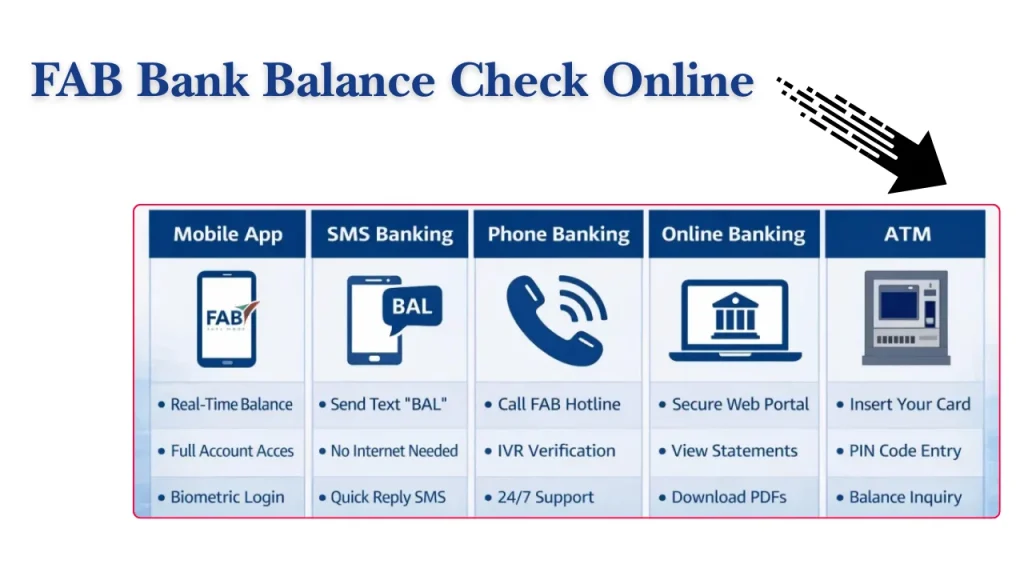
| Method | Best For | Internet Required | Speed | Availability |
| Mobile Banking App | Everyday users | Yes | Instant | 24/7 |
| Internet Banking | Detailed account access | Yes | Instant | 24/7 |
| Salary Card Portal | Salary card holders | Yes | Instant | 24/7 |
| ATM Balance Check | Cash users | No | Instant | 24/7 |
| SMS Banking | Quick enquiries | No | Fast | 24/7 |
| Phone Banking | Non-tech users | No | Fast | 24/7 |
| Customer Care | Account support | No | Moderate | Support Hours |
| Payit Wallet | Digital wallet users | Yes | Instant | 24/7 |
| Branch Visit | Personal assistance | No | Moderate | Branch Hours |
| PPC Inquiry Portal | Prepaid card users | Yes | Instant | 24/7 |
FAB Balance Check Online Through Mobile Banking App
For most UAE residents, the mobile banking application is the fastest and most convenient way to perform a fab bank balance check online.
The app provides instant access to balances, transactions, transfers, cards, and account services from anywhere.
Benefits of Using the Mobile App
The mobile application offers several advantages:
- Real-time balance updates
- Secure biometric login
- Quick salary verification
- Easy fund transfers
- Access to account statements
- Card management features
- 24/7 account monitoring
Requirements Before Registration
Before registering, make sure you have:
- An active bank account
- A registered UAE mobile number
- Valid Emirates ID details
- Access to OTP verification messages
- A stable internet connection
How to Register for Mobile Banking
Registration usually takes only a few minutes.
Download the Mobile App
Download the official banking application from the Apple App Store or Google Play Store.
Verify Mobile Number
Enter your registered mobile number to begin the verification process.
Complete OTP Authentication
A one-time password (OTP) will be sent to your mobile number for identity confirmation.
Create Login Credentials
Set up your username, password, and security preferences to complete registration.
How to Check FAB Balance Online Using the App
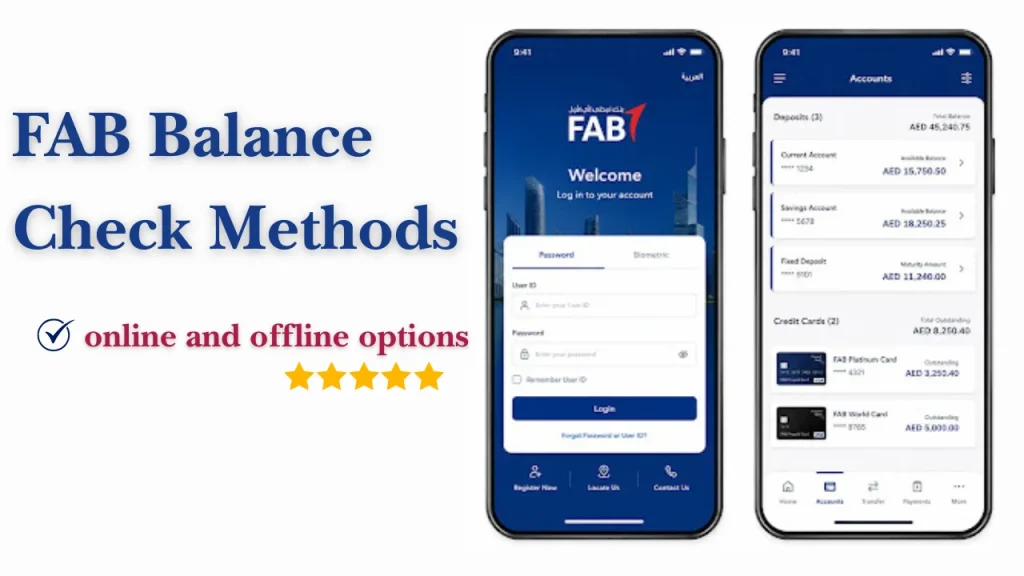
Once registered, checking your balance becomes simple.
Log In Securely
Open the application and sign in using your credentials or biometric authentication.
Access the Dashboard
After logging in, the dashboard displays your linked accounts and banking products.
View Account Balance
Select the account you wish to review. Your available balance will be displayed instantly.
Check Transaction History
You can also view recent deposits, withdrawals, salary credits, transfers, and card transactions.
Mobile App Security Tips
Follow these practices when performing a fab check balance enquiry through mobile banking:
- Enable biometric login
- Use a strong password
- Avoid public Wi-Fi networks
- Keep the app updated
- Never share OTP codes
- Log out after using shared devices
Common Mobile App Issues and Solutions
| Issue | Possible Solution |
| OTP not received | Verify registered mobile number |
| Login error | Reset password and try again |
| App crashing | Update to the latest version |
| Balance not updating | Refresh account data |
| Slow loading | Check internet connection |
| Account locked | Contact customer support |
FAB Bank Balance Check Online via Internet Banking
Internet banking remains one of the most reliable ways to perform a fab bank balance check online, especially for users who prefer managing finances on a desktop or laptop.
Requirements for Online Banking Access
Before using internet banking, customers should have:
- An active account
- Registered online banking access
- Username and password
- Access to OTP verification
How to Register for Online Banking
Customers can register online by providing account information, verifying identity, and creating login credentials.
Steps to Perform FAB Bank Balance Check Online
Follow the given steps to perform fab bank balance check online:
Visit the Official Banking Portal
Open the official online banking website using a secure browser.
Log In to Your Account
Enter your username and password.
Complete Multi-Factor Authentication
Verify your identity using the OTP sent to your registered mobile number.
View Account Dashboard
Once logged in, the dashboard provides a complete account summary.
Check Detailed Account Information
Select the relevant account to view:
- Available balance
- Current balance
- Recent transactions
- Salary deposits
- Pending payments
Common Online Banking Login Problems
Common issues include:
- Incorrect username
- Expired password
- Browser compatibility issues
- OTP delivery delays
- Temporary maintenance periods
Most problems can be resolved through password reset options or customer support.
FAB Salary Card Balance Check Online
Many employees in the UAE receive salaries through payroll cards or salary cards. A fab salary card balance check online allows workers to verify deposits without visiting a branch.
Different Types of Salary Cards
Several salary-related products are commonly used.
Payroll Cards
Payroll cards are widely used by employers to distribute salaries electronically.
Digital Salary Accounts
Digital salary accounts combine salary management with online banking services.
Employee Salary Cards
These cards allow employees to access wages, withdraw cash, and monitor transactions.
How to Perform FAB Salary Card Balance Check Online
Several options are available for checking salary card balances.
Using the PPC Inquiry Portal
Salary card holders can enter card information through the online PPC enquiry portal to view available balances.
Using Mobile Banking
Eligible users can link salary cards to mobile banking services and access balance information instantly.
Using Internet Banking
Customers with online banking access can review salary account balances through their web dashboard.
Information Required for Salary Card Balance Check
Users may need:
- Card number details
- Card identification information
- Registered mobile number
- Security verification information
- OTP authentication where applicable
Salary Card Balance Check for UAE Employees
A fab salary card balance check UAE enquiry is particularly useful for employees who wish to:
- Confirm salary deposits
- Track payroll credits
- Monitor spending
- Verify available withdrawal funds
- Review transaction activity
Checking balances regularly can help employees identify payroll issues quickly and contact their employer if necessary.
Common Salary Card Issues and Fixes
| Problem | Solution |
| Salary not showing | Wait for processing and refresh balance |
| Card blocked | Contact customer support |
| OTP not received | Verify mobile number |
| Portal access issue | Try again later or clear browser cache |
| Incorrect balance | Review recent transactions |
| Card expired | Request card replacement |
FAB Ratibi Card Balance Check
The Ratibi card is a popular salary payment solution used by many employers across the UAE. Employees can perform a ratibi fab balance check online without needing a traditional bank account.
Checking your Ratibi balance regularly helps confirm salary deposits, monitor spending, and avoid declined transactions due to insufficient funds.
How to Check Ratibi Card Balance Online
The most common method is through the PPC inquiry portal.
Open the PPC Inquiry Portal
Visit the official prepaid card enquiry portal using a secure internet connection.
Enter Card Details
Provide the required card information, including the last digits of the card number and any requested identification details.
Complete Verification
Complete the security verification process to confirm account ownership.
View Balance Information
Once verification is completed, your available balance and card information will appear on the screen.
Common Ratibi Card Problems
Users occasionally experience issues when performing a fab balance check salary online.
Common problems include:
- Incorrect card information entered
- Temporary portal downtime
- Delayed salary processing
- Expired salary card
- Mobile verification issues
If your salary has not appeared after the expected payment date, contact your employer before reporting the issue to customer support.
FAB Prepaid Card Balance Check
Prepaid cards provide a convenient way to receive funds, manage spending, and make purchases without using a traditional current account.
A fab balance check enquiry for prepaid cards can be completed through several channels.
What Is a Prepaid Card?
A prepaid card stores funds that have already been loaded onto the card. The available balance decreases as purchases, transfers, or withdrawals are made.
Many UAE residents use prepaid cards for salary payments, travel spending, and controlled budgeting.
How to Check Prepaid Card Balance Online
Several balance enquiry options are available.
PPC Inquiry Portal
The prepaid card portal remains one of the fastest methods for checking available funds.
Mobile Banking
Eligible prepaid cards can be linked to mobile banking applications for real-time balance monitoring.
ATM Balance Inquiry
Customers can insert their prepaid card into a compatible ATM and select the balance enquiry option.
Customer Service Assistance
Customer support teams can assist users who cannot access digital services.
FAB Balance Check Through PPC Inquiry Portal
The PPC Inquiry Portal is widely used by salary card holders and prepaid card users across the UAE.
It provides a simple way to perform a fab salary card balance check online without requiring full internet banking registration.
Required Information Before Starting
Before using the portal, keep the following information ready:
- Card number details
- Card identification information
- Internet access
- Updated browser
Step-by-Step PPC Balance Inquiry Process
Enter Card Number Details
Input the requested card information exactly as shown on your card.
Enter Card ID
Provide the card identification number required by the portal.
Complete Security Verification
Complete the verification process to confirm you are the authorised card holder.
View Available Balance
The system will display your available balance and related account information.
Troubleshooting PPC Inquiry Errors
If the portal does not display your balance:
- Verify card information carefully
- Refresh the page
- Clear browser cache
- Try another browser
- Wait during maintenance periods
- Contact customer support if the issue continues
FAB ATM Balance Check
A fab atm balance check is one of the easiest offline methods available. It is especially useful when internet access is unavailable.
Most ATMs operate 24 hours a day across the UAE, making them convenient for balance enquiries and cash withdrawals.
Benefits of ATM Balance Inquiry
ATM balance checks provide several advantages:
- No internet required
- Immediate balance display
- Available 24/7
- Option to print receipts
- Access across the UAE
Step-by-Step FAB ATM Balance Check Process
Insert Card
Insert your debit, salary, or prepaid card into the ATM.
Enter PIN
Input your confidential PIN securely.
Select Balance Inquiry
Choose the balance enquiry option from the ATM menu.
Choose Account Type
Select the appropriate account if multiple options appear.
View Balance
Your available balance will appear on the ATM screen.
Print Receipt (Optional)
You may choose to print a receipt for future reference.
ATM Safety Tips
When conducting a fab bank balance check, follow these safety measures:
- Shield your PIN while entering it
- Avoid accepting assistance from strangers
- Use ATMs in secure locations
- Keep your receipt secure
- Report suspicious ATM activity immediately
Common ATM Issues and Solutions
| ATM Issue | Suggested Solution |
| Card retained by ATM | Contact customer support immediately |
| Incorrect PIN attempts | Wait and reset PIN if required |
| ATM offline | Visit another ATM |
| Balance not displayed | Retry after a few minutes |
| Receipt unavailable | Check balance through mobile banking |
FAB Balance Check Salary via SMS Banking
SMS banking remains useful for customers who do not have regular internet access.
A simple text message can provide quick balance information without opening a banking application.
How SMS Banking Works
SMS banking connects your registered mobile number to banking services.
Once activated, users can request balance information through approved SMS commands.
SMS Banking Registration Methods
Registration is generally required before using SMS services.
Registration Through ATM
Many customers activate SMS banking directly from an ATM menu.
Registration Through Customer Support
Support representatives can assist with registration after identity verification.
Registration at a Branch
Customers may also request SMS banking activation during a branch visit.
SMS Format for Balance Enquiry
The exact SMS format may vary depending on the banking service being used. Customers should always use the latest instructions provided through official banking channels.
Understanding SMS Balance Responses
A typical balance enquiry response may include:
- Available balance
- Account reference information
- Recent account updates
- Service notifications
FAB Balance Check Through Phone Banking
Phone banking remains a practical option for customers who prefer speaking with automated systems or support representatives.
What Is Phone Banking?
Phone banking allows customers to access account information through an automated Interactive Voice Response (IVR) system.
How to Check Balance Through IVR
Call the Banking Helpline
Dial the official customer support number from your registered mobile phone.
Identity Verification Process
Complete the required security verification steps.
Access Balance Information
Follow the menu options to hear your available balance and account information.
Information Required for Verification
Customers may need:
- Account details
- Card information
- Registered mobile number
- Security questions
- Personal identification information
FAB Balance Check Using Payit Wallet
Payit is a digital wallet solution that allows users to manage funds, payments, and balance information through a mobile application.
What Is Payit Wallet?
Payit is designed for digital payments, transfers, and account management. Users can access funds and monitor balances through the app.
How to Register for Payit
Registration typically involves:
- Downloading the application.
- Creating an account.
- Verifying identity details.
- Linking eligible accounts or cards.
Steps to Check Balance Using Payit
Sign In to Payit
Open the application and log in securely.
Navigate to Balance Section
Access the wallet dashboard to view account information.
View Available Funds
The current available balance will be displayed on screen.
FAB Balance Check Through Branch Visit
Although digital banking is increasingly popular, branch visits remain useful for customers requiring personal assistance.
When Visiting a Branch Is Useful
A branch visit may help when:
- Online access is unavailable
- Identity verification is required
- Cards are blocked
- Account issues need investigation
- Additional banking services are needed
Documents Required
Carry the following when visiting a branch:
- Emirates ID
- Passport (if applicable)
- Account information
- Salary card or debit card
Step-by-Step Branch Balance Enquiry Process
Take a Queue Token
Collect a queue number and wait for your turn.
Verify Identity
Present identification documents for verification.
Request Balance Information
A banking representative will provide your current balance details.
Additional Banking Services Available at Branches
Branches can also assist with:
- Account opening
- Card replacement
- Statement requests
- Salary certificates
- PIN reset services
- Customer profile updates
FAB Balance Check for International Users
Many UAE residents travel frequently or live overseas while maintaining local banking accounts.
Fortunately, balance enquiries can still be completed from outside the country.
Checking Balance While Outside the UAE
Most digital banking channels remain available internationally, provided customers have internet access and valid login credentials.
Mobile Banking Access Abroad
The mobile application is generally the most convenient option for international users.
Customers can:
- Check balances
- Monitor transactions
- Receive account alerts
- Manage cards remotely
Internet Banking Access Abroad
Online banking portals allow secure access from most countries.
Users should always access accounts through trusted devices and secure internet connections.
International Customer Support Options
International customers may access support through:
- Customer service helplines
- Secure messaging channels
- Mobile banking support features
- Online enquiry forms
Security Considerations for Overseas Access
When checking balances outside the UAE:
- Avoid public Wi-Fi networks
- Enable two-factor authentication
- Monitor account activity regularly
- Keep contact information updated
- Use trusted devices only
These precautions help protect personal and financial information while travelling or living abroad.
Here is Part 3 of the article.
FAB Balance Check by Account Type
Different account types provide different banking features and balance enquiry options. Understanding your account category helps you choose the most suitable balance checking method.
| Account Type | Description |
| Current Account Balance Check | Current accounts are designed for everyday banking and regular transactions. Customers can check balances through mobile banking, internet banking, ATMs, SMS services, and branches. |
| Savings Account Balance Check | Savings accounts help customers save money while earning applicable returns. Balances can be monitored through digital banking platforms and ATM services. |
| Salary Account Balance Check | Salary accounts receive monthly payroll deposits from employers. Regular balance checks help employees confirm salary credits and track income. |
| Credit Card Balance Check | Credit card holders can view outstanding balances, available credit limits, and recent transactions through digital banking channels. |
| Prepaid Card Balance Check | Prepaid cards allow users to spend loaded funds. Balances can be checked through enquiry portals, ATMs, mobile banking, or customer support. |
| Payroll Card Balance Check | Payroll cards are commonly used for employee salary distribution in the UAE. Balance enquiries help workers verify salary deposits and available funds. |
| Digital Account Balance Check | Digital accounts provide online banking features without requiring frequent branch visits. Customers can monitor balances anytime through mobile and internet banking. |
FAB Credit Card Balance Check
Checking your credit card balance regularly helps avoid missed payments, late fees, and overspending.
How to Check Credit Card Balance
Customers can check their credit card balance using:
- Mobile banking applications
- Internet banking portals
- ATM services
- Phone banking support
- Customer care assistance
A credit card balance enquiry usually displays:
- Outstanding balance
- Available credit limit
- Recent transactions
- Payment due date
- Minimum payment amount
Regular monitoring helps maintain healthy credit usage and better financial management.
Comparison of All FAB Balance Check Methods
Different balance enquiry methods suit different customer needs. The table below provides a quick comparison.
| Method | Speed | Internet Required | Best For | Availability |
| Mobile Banking App | Instant | Yes | Everyday banking users | 24/7 |
| Internet Banking | Instant | Yes | Detailed account management | 24/7 |
| Salary Card Portal | Instant | Yes | Salary card holders | 24/7 |
| PPC Inquiry Portal | Instant | Yes | Prepaid card users | 24/7 |
| ATM Balance Check | Fast | No | Offline balance checks | 24/7 |
| SMS Banking | Fast | No | Quick enquiries | 24/7 |
| Phone Banking | Fast | No | Non-tech users | 24/7 |
| Payit Wallet | Instant | Yes | Digital wallet users | 24/7 |
| Customer Support | Moderate | No | Account assistance | Support Hours |
| Branch Visit | Moderate | No | Personal service | Branch Hours |
Common FAB Balance Check Problems and Solutions
Users may occasionally face issues while performing a fab bank balance check online or using offline banking channels.
| Problem | Possible Cause | Recommended Solution |
| OTP Not Received | Mobile network delay | Wait a few minutes and request a new OTP |
| Incorrect Login Credentials | Wrong username or password | Reset credentials using the password recovery option |
| Locked Account | Multiple failed login attempts | Contact customer support to unlock the account |
| Wrong Registered Mobile Number | Outdated contact details | Update your mobile number through official channels |
| Technical Downtime | Scheduled maintenance | Wait until services are restored |
| ATM Transaction Errors | Network or machine issue | Retry later or use another ATM |
| Card Not Recognised | Damaged or expired card | Request a replacement card |
| PPC Portal Access Issues | Browser or server issue | Clear browser cache or try another browser |
| Delayed Balance Updates | Processing delay | Refresh the account and check again later |
| Server Maintenance Problems | System upgrades | Wait until maintenance is completed |
Security Tips for Safe FAB Balance Checks
Protecting your banking information is important when performing any balance enquiry.
- Use only official banking websites and mobile applications.
- Never share OTP codes with anyone.
- Enable biometric authentication whenever available.
- Avoid checking balances on public Wi-Fi networks.
- Keep mobile banking applications updated.
- Monitor transactions regularly for suspicious activity.
- Protect account details, passwords, and personal information.
Benefits of Checking Your FAB Balance Regularly
Regular balance monitoring offers several practical benefits.
- Prevent unauthorised transactions from going unnoticed.
- Avoid insufficient balance issues before payments are due.
- Confirm salary deposits quickly.
- Manage monthly expenses more effectively.
- Monitor automatic deductions and subscriptions.
- Improve budgeting and financial planning.
- Verify account activity and transaction accuracy.
- Stay informed about available funds before making purchases.
Common Mistakes Users Make
Many balance enquiry issues can be avoided by following good banking practices.
- Entering incorrect card or account details.
- Using unofficial websites for balance enquiries.
- Ignoring security alerts and warnings.
- Failing to update registered mobile numbers.
- Attempting to use expired cards.
- Forgetting usernames, passwords, or login credentials.
Conclusion
A FAB balance check is one of the simplest yet most important banking activities for UAE residents, employees, salary card holders, and prepaid card users. Regular balance monitoring helps confirm salary deposits, track spending, prevent financial surprises, and identify suspicious transactions early.
Whether you prefer fab balance check online through mobile banking, internet banking, salary card portals, or offline options such as ATMs, SMS banking, and phone banking, there are multiple secure methods available in 2026. Choosing the right option depends on your account type, internet availability, and personal preference.
FAQs
How can I perform a FAB balance check online?
You can perform a balance check online through mobile banking, internet banking, salary card portals, or prepaid card enquiry systems.
How do I complete a FAB bank balance check online without visiting a branch?
Simply log in to mobile banking or internet banking using your registered credentials and view your account balance from the dashboard.
How can I perform a FAB salary card balance check online?
Salary card holders can use the PPC Inquiry Portal, mobile banking services, or internet banking to view their available balance.
What is the easiest method for FAB salary card balance check?
For most users, the PPC Inquiry Portal is one of the quickest and easiest methods for checking salary card balances.
Can I check my FAB balance without internet access?
Yes. You can use ATM balance enquiries, SMS banking, phone banking, or customer support services.
How do I perform a FAB ATM balance check?
Insert your card into an ATM, enter your PIN, select “Balance Inquiry,” choose the account type, and view your available balance.
What should I do if my balance is not updating?
Refresh your account, check for service notifications, wait a few minutes, and contact customer support if the issue continues.
Is it safe to check my balance on public Wi-Fi?
Public Wi-Fi networks are generally not recommended for banking activities. Use secure mobile data or trusted private networks whenever possible.
How can I check my credit card balance and available limit?
Credit card balances and available limits can be viewed through mobile banking, internet banking, ATMs, phone banking, or customer support.
What information is required for salary card balance enquiries?
You may need card details, identification information, a registered mobile number, and security verification information.
What should I do if I forget my online banking password?
Use the password recovery option available on the login page, complete identity verification, and create a new password securely.